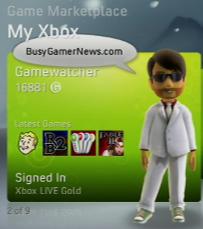
 Veterans of this site know I've invested a lot of time and energy into critiquing the various console dashboards. The Xbox 360 - after a bumpy start and a few hurdles along the way - has been my favorite interface for playing games and accessing media. So I was skeptical when I heard about this New Xbox Experience that would revolutionize the way I interact with my console.
Even though I followed this update closely and previewed it at PAX 2008, it was with a few pangs that I said goodbye last night to my 360's Blades-style interface. It took about 20-30 minutes to fully install, and afterwards treated me to a pretty though over-the-top video welcome:
They had me with the melting logo! They could have stopped there, and doing so might have reduced or eliminated the need for a hard drive or memory card to install this sucker on. I mean, that video had to be at least half the download! (My guess is that the other half is avatar content.)
 Then my 360 prompted me to create my Mii, er, I mean avatar. The character customization choices were expansive. I actually prefer the slick art style to Nintendo's more child-like creations. That said, I was a little disappointed in how few clothing and accessory choices are available, though I'm sure that's because they want to limit our default wardrobe selection so we'll be more inclined to buy designer outfits when they become available.
 My next stop was Netflix. You'll have to download and install a small app (another 3MB, as I recall). Then, after you link your Netflix account using a special code your 360 supplies and run a time-consuming network optimization routine, you'll be able to access your Instant Queue. Movies hardly start instantaneously (buffering takes at least half a minute), and the video quality was muddy and artifact-ridden, at least over my meager 1.5Mbps DSL connection. Even the slightest amount of fast forward or rewind required about 20 seconds of rebuffering. I'm upgrading to 3Mbps (only $10 more a month) so we'll see if that makes a difference.
Even with the flaws, it's a pretty decent deal considering it costs you nothing extra over a standard Netflix subscription and you get all-you-can-watch content on demand from the choices available for streaming. Too bad they had to cut the feature that lets you t have a Netflix party with fellow subscribers, but perhaps it will be offered later. If Microsoft and Netflix are smart, they will invest heavily in this feature since both sides stand to benefit from it if it goes mainstream - it could become a huge system and subscription seller!
Breaking news: I just learned that several of the movies I had planned to watch (including Spider-Man 3) have been pulled by Sony from the Netflix queue. You can still watch them on PC and other settop boxes, but not on the 360. Oh well - I might have picked that movie up on Blu-Ray (and quite a few others) if it turned out I liked it.
The final new major Xbox 360 feature that I tried right away was Play from Hard Drive. I cleared out about 20GB of space on my 120GB drive in anticipation of ripping Fallout 3 and Rock Band 2 for faster load times (you need about 6-7GB per game). Fallout 3 already loads pretty fast initially, but running from the hard drive the wait times when accessing a new locale are slightly quicker, and over a 60-80 hour game that will make a difference. Not sure if it justifies the 10 minutes or so it takes to copy a game, but it was easy enough to let it run while I was working on dinner. Probably not worth having a second drive dedicated just to ripped games, but I'll keep my 1-2 most active titles ripped for now.
The new UI will take some getting used to, and I am mourning the familiar Blades interface. For what it's worth, the Blades weren't totally nuked; you see them when you press the Guide button. Be careful, though, since some Guide functions will cancel operations such as the Netflix streaming test (I clicked to Settings to see if there were any new ones and had to start the whole thing over).
On the whole, it is drenched in marketing. Everywhere you look (even the Guide menu) has plugs for things you can buy. Some of them are contextual and others are editorially programmed, which is somewhat better than the fully random ads of the previous dashboard.
I'm not sure if the Marketplace overhaul is a revolutionary improvement. Having oversized visuals of all the games is nice, but many areas require longer initial load times as a result. I miss being able to scroll quickly through the list of new arrivals. And my SlingPlayer has no functioning Y button that I can find, so I cannot easily access the full listings remotely. These will make my weekly Xbox 360 Marketplace round-ups a bit more time consuming (and it was already becoming a chore). The addition of dates and elimination of autoscrolling descriptions are welcome changes, though they don't quite balance out - at least not for me.
Community games are listed in the new dashboard, but none were available for trial or purchase yet. I'm guessing they will launch with the dashboard or shortly after.
There's a lot here to like, but it still has a way to go. I hope Microsoft continues the trend of offering spring and fall dashboard (experience?) updates. Sony's model of "patch whenever" is too frequent and locks you out of things unless you're prepared to stop everything to download and install a weighty update. Nintendo's approach is too rare and unpredictable: New features and improvements just don't appear very often, and when they do they're usually underwhelming.
Somewhere in the middle is the best experience, I suspect.
Leave a comment